Skip to content
FleetPoynt · Vehicle records & fleet operations

Turn scattered vehicle lists into a clean digital register.

FleetPoynt turns the vehicle lists you already keep into one clean, searchable register — duplicates flagged, and a human in control before anything is saved. It then keeps that register living: a log book behind every vehicle, and a reminder before anything lapses.

What it is
A web app. You use it in a browser.
Installs onto a phone once you sign in — no app store, nothing to download.
Who it's for
Organisations that own their vehicles.
Courts, ministries, universities, hospitals, companies running their own fleet. Not workshops servicing customers' cars — there is no customer in FleetPoynt.
How you start
Upload the list you already keep.
A spreadsheet, or photographs of the bound book. A 30-day pilot from there.
Does not replace official vehicle registration. Human review before any record changes.
Example import · the file shown here
128Rows uploaded
9Need review
6Duplicates found
/ the mark on every entry

Every fleet system records what happened. This one records when it was written down.

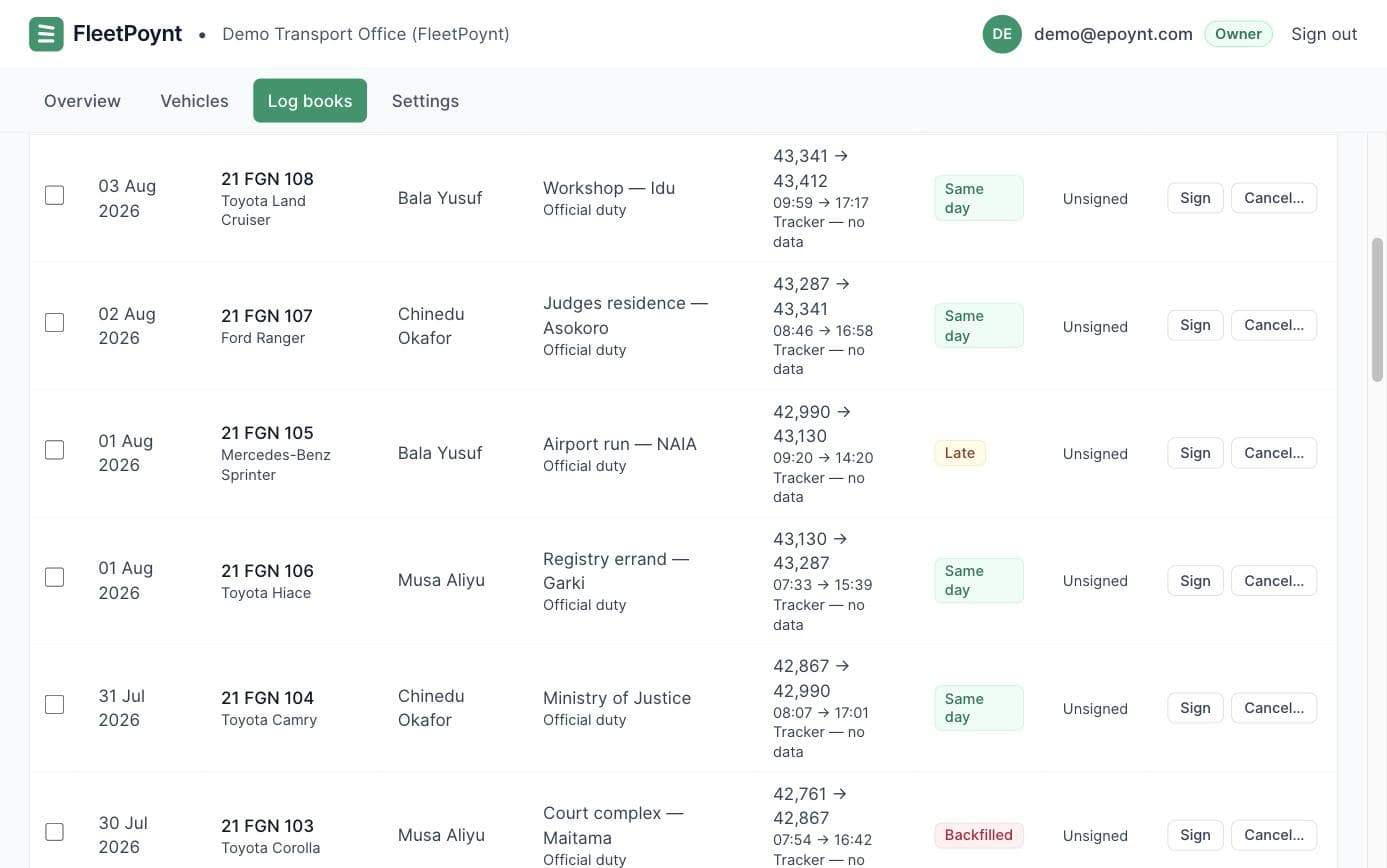
An entry made the day of the trip and an entry made three weeks later are not the same evidence. FleetPoynt marks the difference on the face of the record — permanently, and without a word of judgement. You can still backfill. Paper fleets always do. It just cannot pass as something it is not.

Same day
Same day
Written the day it happened. The strongest entry you can have.
Late+3 days
Late
Written one to seven days after. Ordinary, and worth knowing.
Backfilled+19 days
Backfilled
Written more than seven days after. Recorded plainly — a backfilled entry people are afraid to make becomes a lie instead.
Migratedat import
Migrated
Transcribed from the bound book at import. Inherited history is honest provenance, not a fault.
Not recorded
Not recorded
A period with no entries reads as not recorded — never 0%, never 100%. A quiet month must not look like a perfect one.
Drivers log · 21 FGN 104
Toyota Hilux · ABC-145-LG · movements
July 2026
14 JulSecretariat → Kubwa store · 184 km · B. AdamuSame day
11 JulAirport run · 62 km · I. MusaLate+3 days
06 JulZonal office circuit · 410 km · B. AdamuBackfilled+19 days
02 JulService run to workshop · 27 km · poolMigratedat import
— no entries 15–31 Jul —
Not recorded. This is not zero movements; it is an absence of entries.
4 movements · 683 km loggedSame-day rate · not recorded for 17 days
/ what FleetPoynt does

The list you have, the register you wanted, and a home for every record.

Three jobs, in the order a transport office actually does them. All three are running in the product today.

Pillar · 01

Bring in the list you already keep

Upload the CSV or Excel file you maintain today — or a PDF or Word register, so long as its text is selectable. FleetPoynt reads the structure, maps your columns onto fleet code, plate and chassis, and drafts entries. History transcribed at import is marked migrated, never passed off as newly recorded.

vehicle_list_q3.xlsx
128 rows · 14 columns · structure OK
Ready
Pillar · 02

Match it, and confirm every change yourself

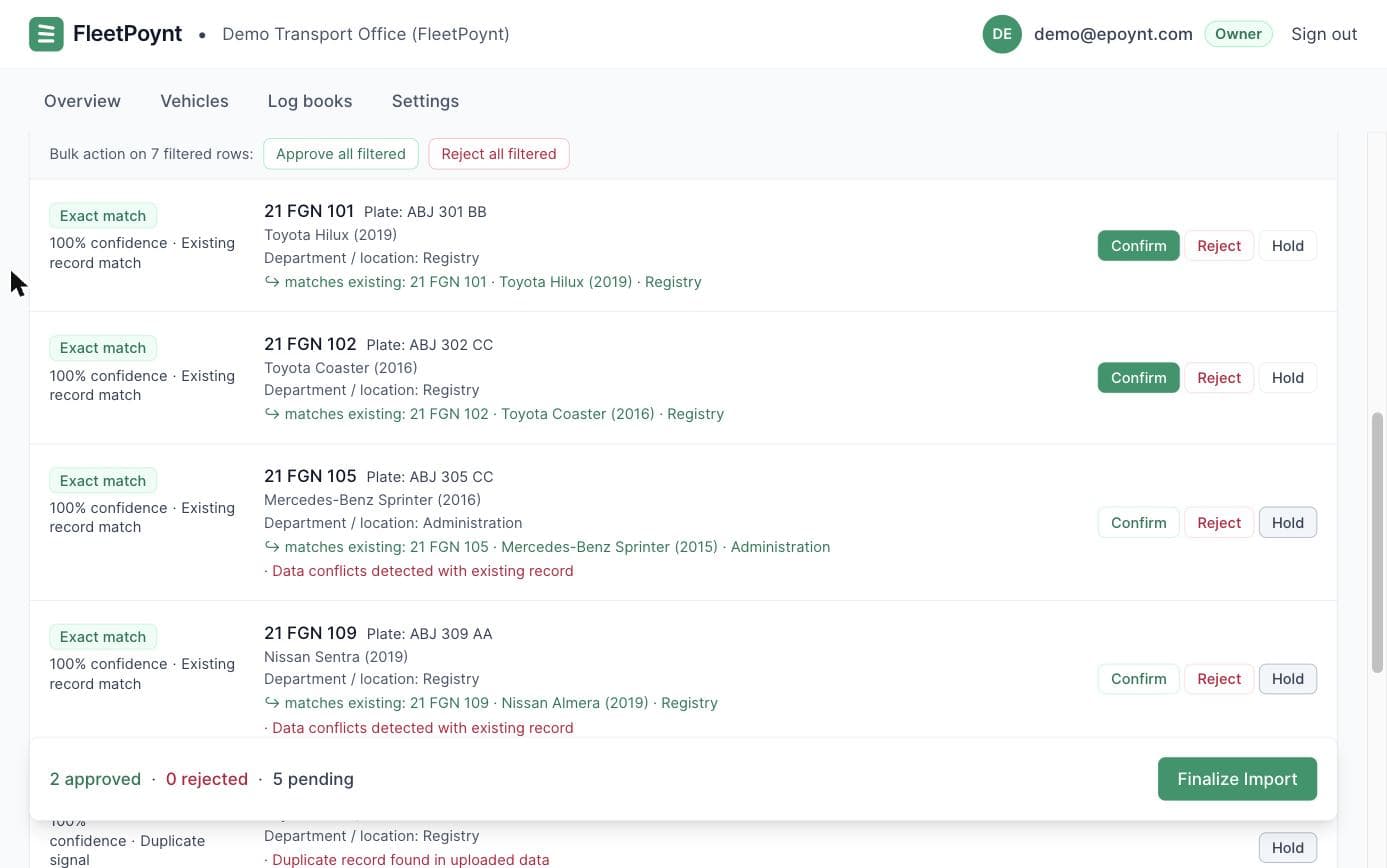
Exact matches, probable matches, duplicates, incomplete rows and genuinely new vehicles, separated and scored — with the differences against the existing record named. Nothing reaches the register until a person says so, one decision at a time.

● Exact match112
● Probable · needs review9
● Duplicate fleet code6
● New vehicle1
Pillar · 03

Keep the log books, and print the paper

Six log books behind every vehicle file, each entry carrying its provenance mark. And FleetPoynt prints the blank job cards and movement sheets your drivers actually write on — pre-printed with the fleet code and the right columns.

MovementsFuelMaintenanceInsurancePapersDisposals
Blank movement sheet · 21 FGN 104
Pre-printed · date, destination, odometer out and in

/ who this is for

Organisations that already have a register. It’s just made of paper.

Twenty vehicles, or three hundred. A transport officer who is personally accountable when the auditors arrive, and custodians who hold one vehicle each and want to know when it is next due for service.

Government transport officesMinistries, departments & agenciesCourts & judicial servicesUniversities & schoolsHospitals & health servicesLogistics operatorsConstruction & worksNGOs & field programmes
/ the actual product

See exactly what you’ll be working in.

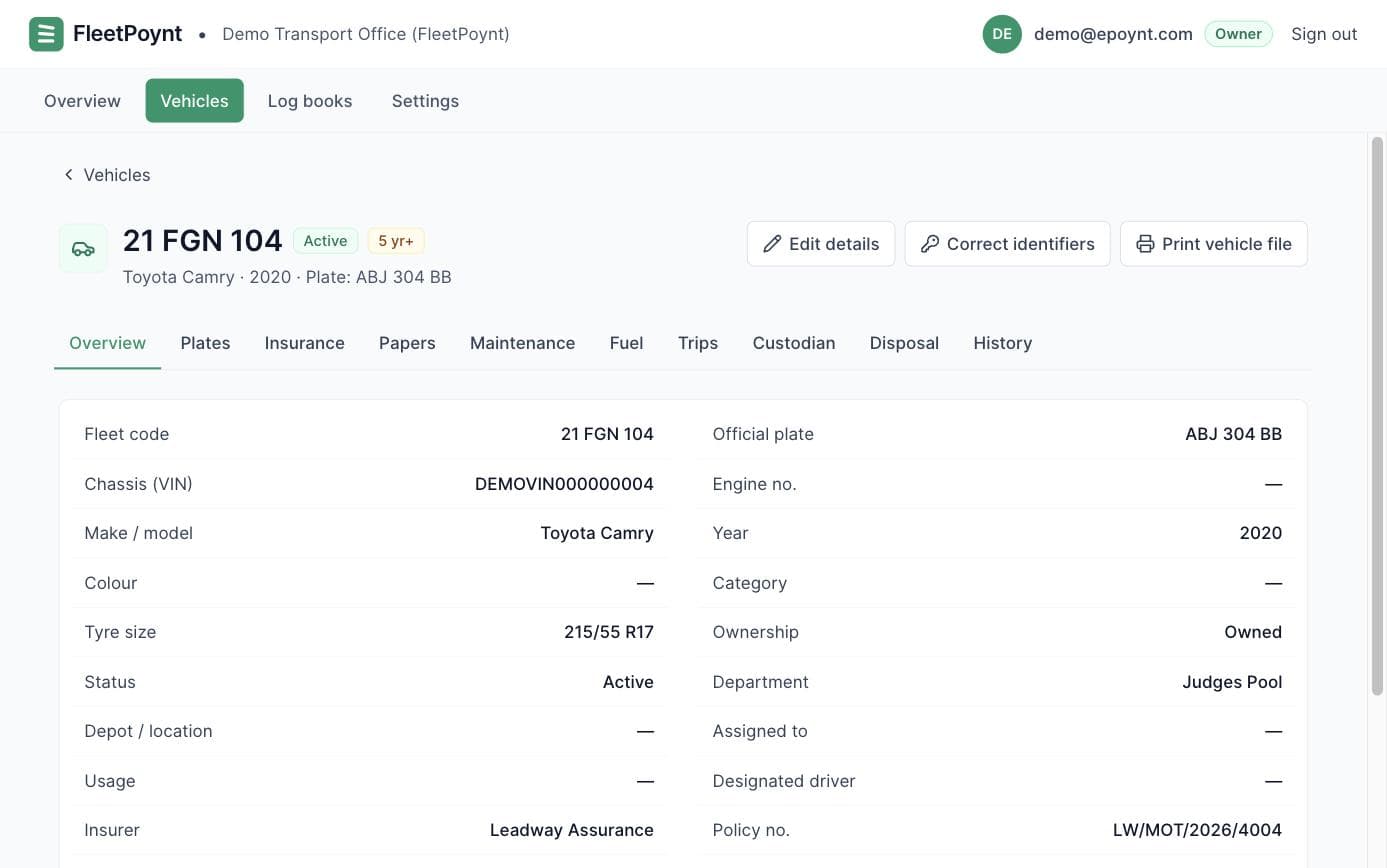
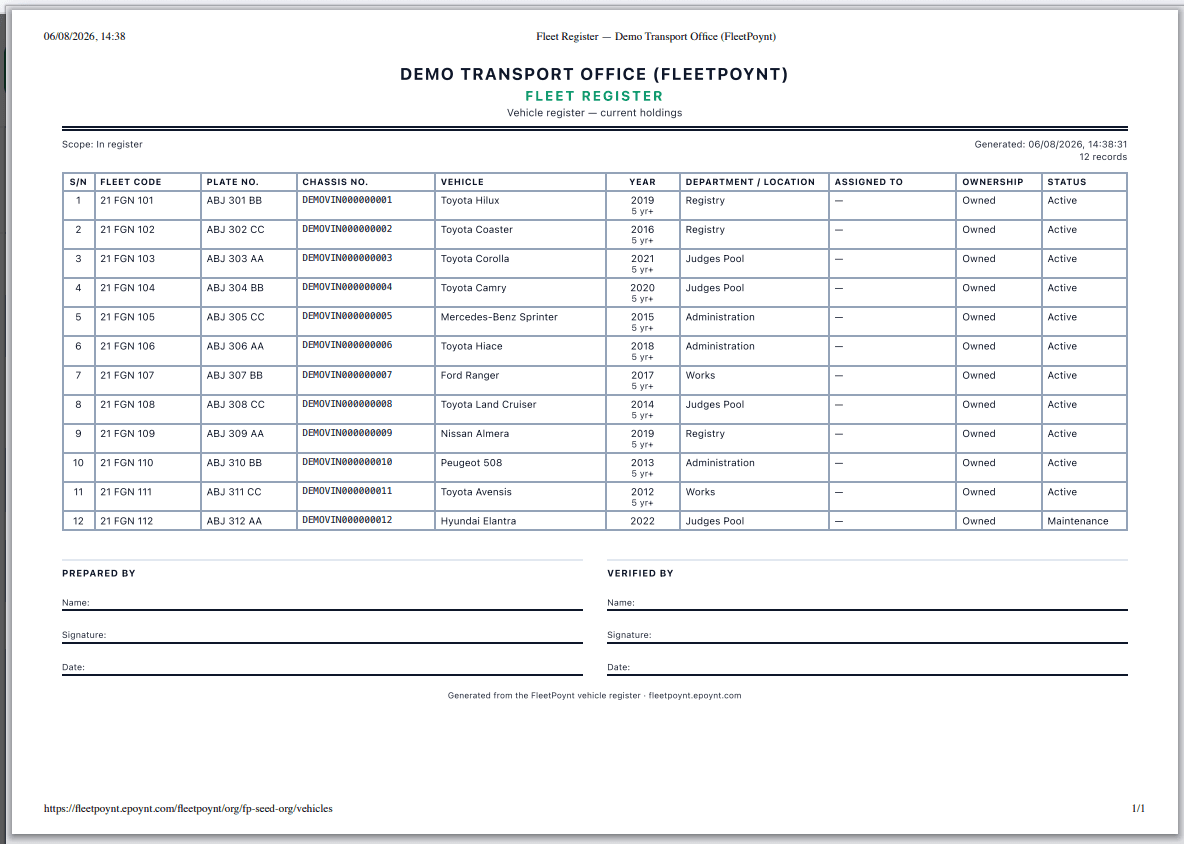
Five screens from our demo organisation — the register, the import queue, a vehicle file, a log book and the printed output. This is the same FleetPoynt you would sign into on day one of a pilot.

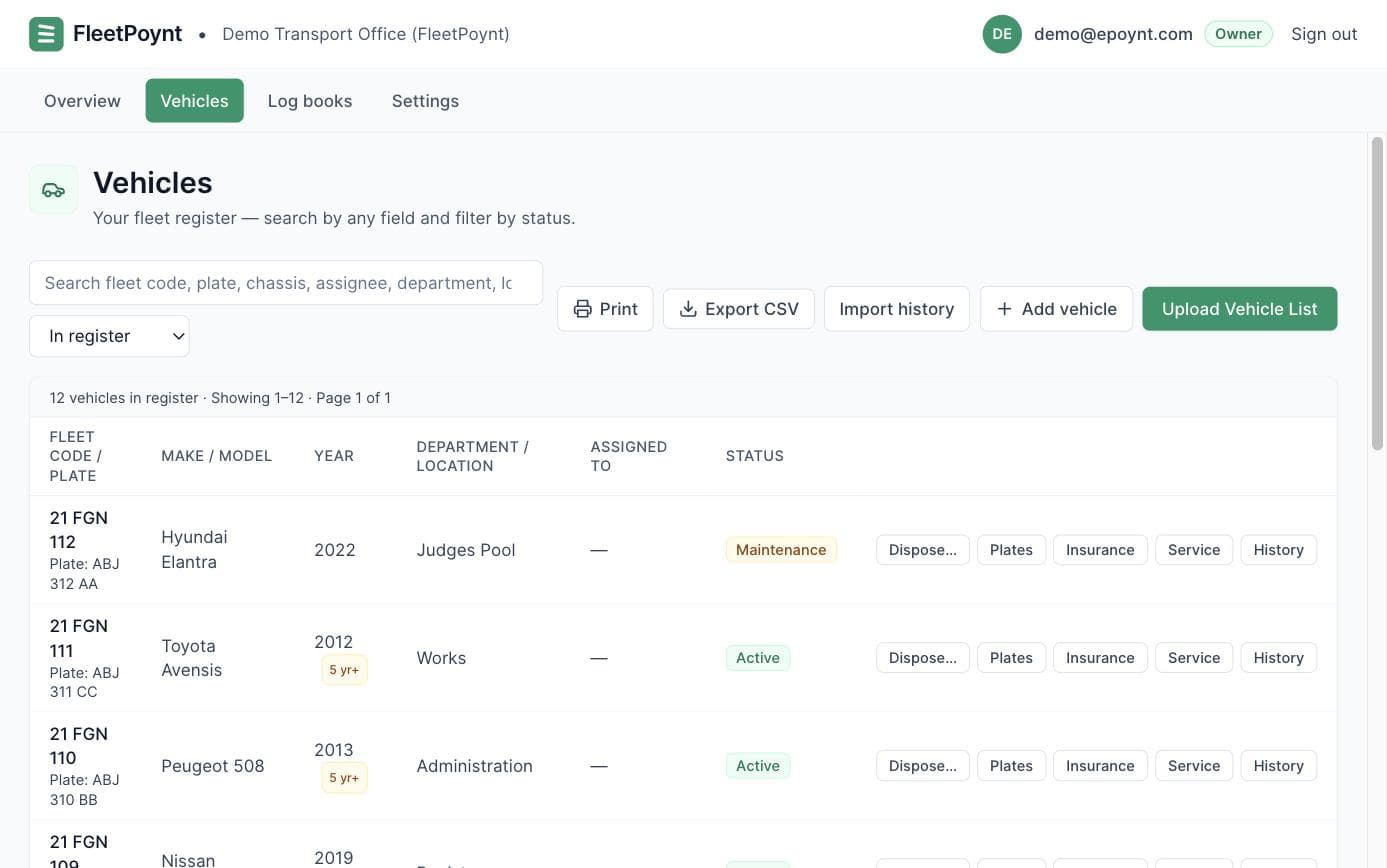
The FleetPoynt vehicle register listing twelve vehicles by fleet code and plate, with department, status and per-row actions.
/ screen 01 of 05

One register, and it is the register.

Fleet code first — it is painted on the door and survives a plate change. Plate second, because that is what the police read.

Fleet code and plate both first-class
Department, status and disposal age per vehicle
Search, filter and export the whole register
Screenshot · demo organisation · 12 vehicles
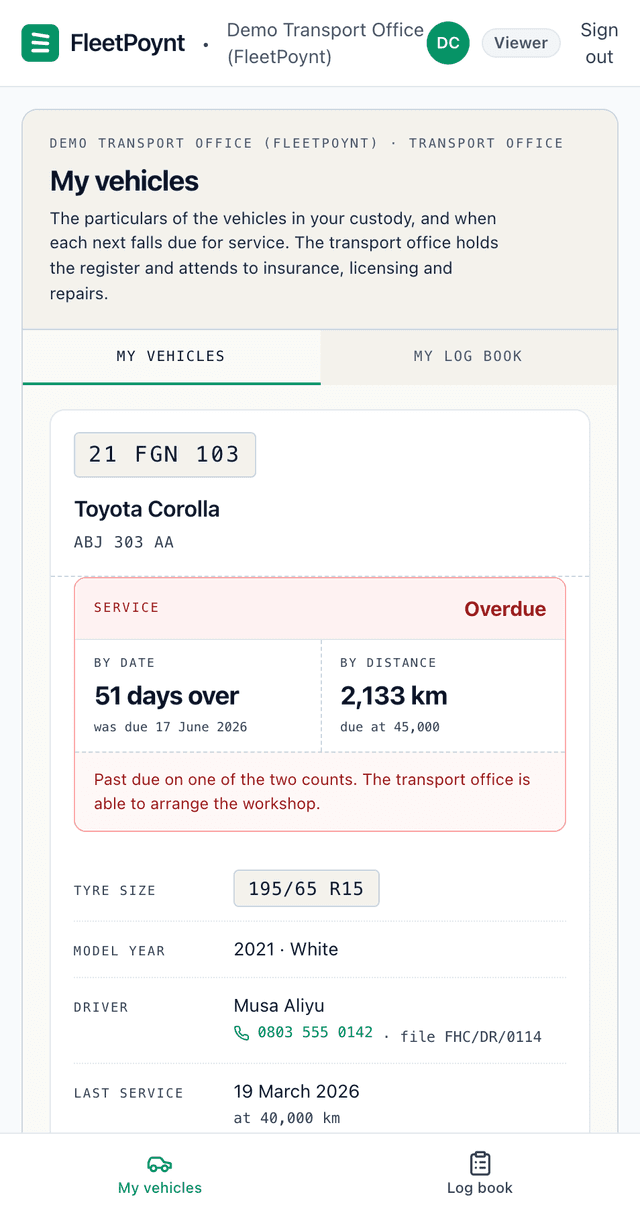
The custodian's My vehicles screen on a phone: fleet code 21 FGN 103, a Toyota Corolla, and a service block marked Overdue — 51 days past the date, with 2,133 km still to run before the distance falls due.
Watch it on a custodian’s phone0:41
/ the people who hold the vehicles

Your custodians will not become your problem.

“If I put forty judges and directors on this, does it become forty phone calls to me?”

No — because the surface they get is deliberately tiny. A custodian sees one vehicle: its fleet code, its tyre size, their driver’s number, and when it next falls due for service on both days and kilometres. That is the whole thing. A custodian who can see their own service-due date is one who stops ringing the office to ask.

No money · no figures at allNo insurance or licence dataNo other vehicle, no fleet totalsInstalls onto their phone after sign-in
The office handles
Compliance, accidents and repairs. Insurance, licensing, roadworthiness and the workshop stay entirely with you.
The custodian handles
Servicing, and otherwise reports. They see what is due and tell you what happened. Nothing is asked of them beyond a tap.
How they hear it · today
Email. One message to the custodian of the vehicle that is due — not the whole fleet’s news, and not a copy of the office’s digest.
How they hear it · next
WhatsApp, built and not yet sending. The same service reminder, on the channel a Judge reads in minutes. The template is approved; we will say so here when the first one goes out.
A driver crouching to check the tyre of a Toyota Hiace in a government office compound.
/ watch it work

Under a minute, one transport office.

A ledger, three spreadsheets and a drawer of certificates — and what the same office looks like once they are one register. A quick guide to what you’ll be using, before you sign into it.

30 days/ pilot

A 30-day pilot, scoped before it starts.

We agree what success means in week one, and check it against the same definition in week four. Any fleet size. Your data stays yours.

01 / 05
What we set up

Your workspace, the vehicle register, roles for the transport office and for custodians, and the import structure — mirroring how the office is already organised.

02 / 05
What we need from you

The vehicle list you already keep, in whatever shape it is. Bring the bound book pages and any certificates too, and we will transcribe them with you during the pilot.

03 / 05
What we test together

Importing the list, resolving duplicates, confirming matches, logging a week of movements, and printing the blank sheets your drivers write on.

04 / 05
What success looks like

One clean register, a vehicle file per vehicle, and a Monday-morning “needs attention” list your officer actually uses.

05 / 05
What you walk away with

A printed monthly report for your director — and your register, exported, yours to keep either way.

Request a fleet register pilot Success criteria agreed up front · no obligation
/ direction of travel

A draft revision of the Financial Regulations asks for a digital asset register.

FleetPoynt implements Chapter 20 of the Financial Regulations, 2009 edition — the edition in force. A draft revision, published by the Accountant-General’s office, would go considerably further.

A database of government property
Part VI of the draft would create an asset-tracking department inside the Accountant-General’s office, charged with developing “a comprehensive database” of Federal Government property.
Every item identified and registered
It names bar-coding among the techniques for identifying and registering that property — item by item, rather than as a schedule of totals.
A digital register, with a custodian
It would make that office “Custodian of FGN’s PPE Digital Register”, and asks every Accounting Officer for a schedule of the assets under their control by 30 June each year.
What this is, and is not

A draft, not a rule.

We would rather point at the source than characterise it. The document is public and says “DRAFT” on its own title page.

This is not law. The draft carries no commencement date and repeals nothing. The 2009 edition remains in force, and it is the one this product implements.
We have no part in it and claim no endorsement. The draft is the Accountant-General’s work. No government office has approved, certified or reviewed FleetPoynt.
What we do say is narrower: an office keeping a per-item digital record today is already doing what the draft describes — whether or not it is ever gazetted.
If it is gazetted, the clause numbers change. The draft renumbers Chapter 20 — vehicle control moves from Regulation 2001 to 2013. Every clause we print names its edition for exactly that reason.

Source: Draft Federal Government Financial Regulations 2023, Office of the Accountant-General of the Federation. In-force edition: Financial Regulations (Revised to January 2009), Official Gazette No. 72, Vol. 96, 27 October 2009.

/ data & control

Built for the room where someone is checking your work.

The auditor never logs in, and that shapes everything. So does the fact that the transport officer is the one personally accountable when they arrive.

Nothing saves without a person
Uploaded lists, scanned documents and drafted entries all stop at a human. The confirm step is visible in the interface, not merely promised in the copy.
Provenance on every entry
When a record was written down is stored alongside what it says, and shown permanently. Entries are never silently rewritten.
Org-scoped, role-separated
Each organisation’s register is isolated. A custodian sees the vehicles in their custody; the transport office sees the fleet. Different documents, not a filtered view.
Encrypted in transit, access-controlled storage
Uploads, scans and certificates are encrypted in transit and reachable only by role.
Your register, exportable
The register and its log books export in full, whenever you ask, in a format you can open without us.
The whole security picture, gaps included
What FleetPoynt is not

The honest column.

Credibility in this market comes from what a product refuses to claim. Being caught overclaiming once ends the sale.

Not a replacement for official vehicle registration, insurance, or any government system. FleetPoynt is your organisation’s internal record.
No live tracking map. Every fleet product has one; we deliberately do not lead with GPS. In real institutional fleets a large share of trackers are offline at any moment — and not at random.
The manual log book is the source of record. Where a tracker connection exists, GPS sits beside it as a second opinion, always labelled with its coverage.
We do not claim NAICOM / NIID insurance verification or government registration sync. Those need official or partner access; if we get it, we will say so then.
WhatsApp reminders are not sending yet. The channel is built and the template is approved. Nothing has yet sent a reminder to a custodian. Reminders reach them by email today, and we would rather say which is which than let one stand for both.
No logo wall, no testimonials, no uptime figure, no compliance badge we do not hold. FleetPoynt is an early product with a small number of real users, and we would rather say that.
/ next step

Bring the list you already have. We'll do the cleaning.

The ledger, the spreadsheets, the drawer of certificates. Thirty days from now it is one register, with a printed report you can put in front of your director.

Get started Human review before any record changes.Prefer a guided start? Request a fleet register pilotAlready using FleetPoynt? Sign in